An Alternative to MCP: Python CLI-Based Agent Skills
2026-03-02
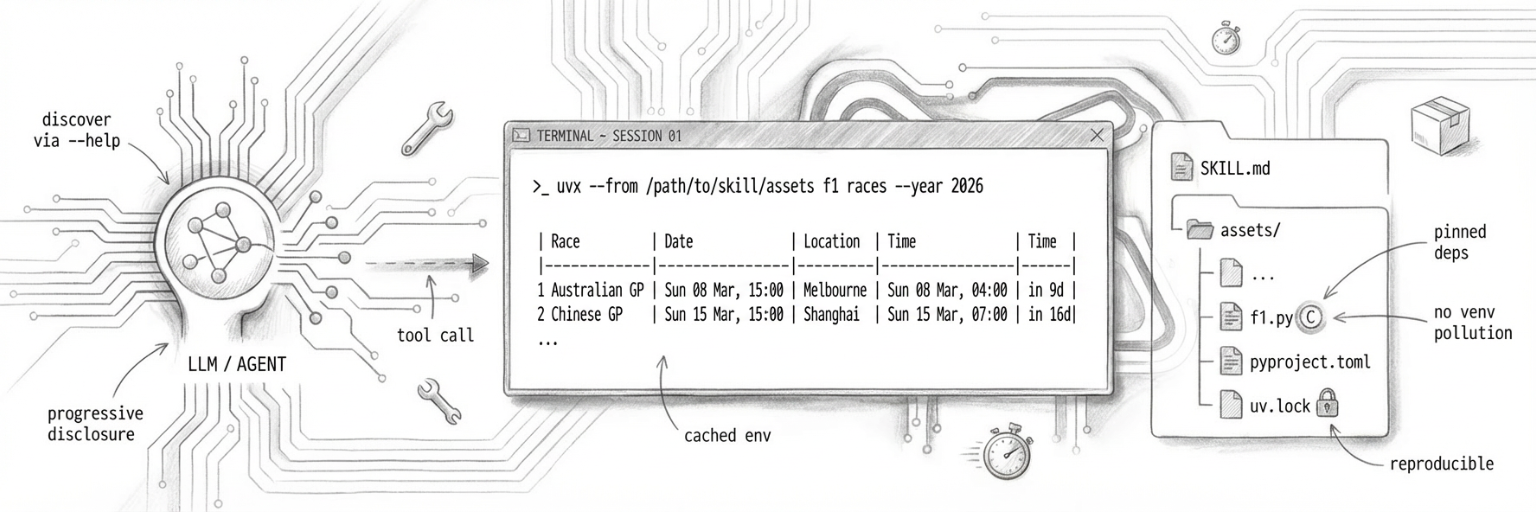
I wrote recently about MCP's patchy reliability and how mature CLI tools wrapped in skills felt more stable. I wanted to explore that idea further — specifically, what if you could build custom Python CLI tools with a skills wrapper and have the same success without managing virtual environments?
Python-tool-skills are that exploration. They're Python CLI tools built with Click, run via uvx, and bundled inside skills. No venv pollution, locked dependencies, just works.
What works: wrapping mature CLI tools
Most CLI tools are battle-tested, predictable, well-documented. Wrapping them in skills works brilliantly. The agent calls a command, parses the output, moves on.
These tools have been used by thousands of developers across wildly different contexts. Error messages are clear. Edge cases are handled. You're building on solid ground.
Most importantly, they are a text efficient, well understood textual interface — one well suited to LLMs. With in-context --help output, the agent can discover capabilities progressively rather than loading full schemas upfront.
But what if you need a custom tool? Skills today tend towards writing a bash script, but anything beyond basic text parsing gets messy. Python's cleaner, but then you're managing virtual environments, dependencies, import paths.
Enter uvx — a tool runner that handles Python package isolation automatically, no venv required. Well, not one you have to manage yourself at least!
Python-tool-skills: CLI tools bundled in skills
So why don't we try building custom tools the same way — as standalone CLIs that just happen to be written in Python?
I've put together what I'm calling a python-tool-skill — an AI agent tool packaged as a skill that bundles a Python CLI in its assets/ directory. The CLI is built with Click and runs via uvx.
You can see examples and try it yourself at github.com/almcc/python-tool-skill-creator.
f1/
├── SKILL.md          ← trigger description + agent instructions
└── assets/
    ├── f1.py         ← Click CLI entry point
    ├── pyproject.toml
    └── uv.lock
The agent runs it with:
uvx --from /path/to/skill/assets f1 races
No venv, no __pycache__, no .pyc files. uvx handles isolation automatically. Dependencies are pinned in a committed uv.lock — reproducible and offline-capable after first cache population.
(I chose F1 as a subject because we are very excited for the 2026 season in our house!)
Why Click
Click is the most mature (and my favourite!) Python CLI framework. It handles argument parsing, option validation, help text generation, error formatting and more.
A minimal Click CLI:
import click
from urllib.request import urlopen
import json

@click.group()
def cli():
    """F1 CLI — Formula 1 data powered by OpenF1."""
    pass

@cli.command("races")
@click.option("--year", default=None, type=int)
def races_cmd(year: int):
    """List all races for a season with circuit and local times."""
    if year is None:
        year = datetime.now().year

    # Fetch from OpenF1 API
    meetings = fetch(f"/meetings?year={year}")
    # ... format and display race calendar
    click.echo(f"Fetching {year} calendar...")

if __name__ == "__main__":
    cli()
Top-level @click.group(), sub-commands with @cli.command(), output via click.echo(). That's it.
Why uvx
uv is a fast Python package manager. uvx is its tool runner — like npx for Python.
Point uvx at a directory with a pyproject.toml, and it installs the package in an isolated environment and runs it. The environment is cached. Subsequent calls are fast.
# First run: installs dependencies, runs command
uvx --from /path/to/assets f1 races

# Subsequent runs: uses cached environment
uvx --from /path/to/assets f1 race 5

# After editing f1.py: force reinstall
uvx --from /path/to/assets --reinstall f1 races
No pip install, no python -m venv, no activation scripts. It just works.
Seeing it in action
Here's what it looks like when the agent uses the F1 skill:
# Agent calls the tool
$ uvx --from /path/to/f1/assets f1 races --year 2026

# Output: formatted race calendar
Fetching 2026 calendar...
  2026 Formula 1 Season — 24 Races
  #  Race                        Circuit               Race Time (Circuit)       Race Time (GMT)         When
-------------------------------------------------------------------------------------------------------------------
  1  Australian GP               Melbourne             Sun 08 Mar, 15:00 UTC+11  Sun 08 Mar, 04:00       in 9d
  2  Chinese GP                  Shanghai              Sun 15 Mar, 15:00 UTC+8   Sun 15 Mar, 07:00       in 16d
...
The agent reads the output, extracts what it needs, and moves on. Same experience as calling and other cli. The fact that it's a custom Python tool is invisible.
Why this works for me
I've been using python-tool-skills for a week or so and they feel significantly more user-friendly than creating custom MCP servers. The biggest win? The tools are just CLI programs. I can run them directly from my terminal, test them independently, and use them outside the agent context.
Comparing to MCP servers
MCP servers offer fine-grained control — you can enable and disable specific tools, control exactly what the agent sees. With CLI-based skills, you lose that granularity. You load the skill, the agent gets access to everything the CLI can do.
But as we trust LLMs more, is this much of a concern? The underlying authentication model of the tool you're calling might be enough. If the tool requires credentials, the agent still can't do anything you haven't authorized. The permission boundary shifts from the agent runtime to the tool itself.
Of course, the LLM still needs a way to instigate a tool call. That mechanism may be MCP, or some kind of custom tool schema specific to that agent runtime. The proposal here isn't about replacing those mechanisms — it's about shifting the interface at which we (the community) build our tooling. Rather than building custom protocols and servers, we build portable CLI tools that any agent can wrap.
I do wonder if we'll eventually see a shell dedicated for LLMs — a safer sandbox in which they can work. Something that provides better guardrails, audit logging, and resource limits than a standard shell, while maintaining the familiar CLI interface pattern.
The cost advantage
There's another compelling reason to prefer CLI tools: they're dramatically cheaper to use. As documented by Kan Yilmaz, CLI-based tools use ~94% fewer tokens than equivalent MCP servers through progressive disclosure — the agent only loads tool details when it needs them via --help, rather than loading complete JSON schemas for every tool upfront.
With 84 tools loaded, MCP burns ~15,540 tokens at session start. The same tools via CLI? ~300 tokens. The agent discovers what it needs on-demand, keeping context focused and costs low.
Beyond Python
Of course, this pattern isn't limited to Python. You could bundle Ruby tools with gem install, Node.js tools with npx, Go binaries, Rust crates — anything that can run as a CLI and be distributed in a portable way. Python-tool-skills just happen to be the convenient starting point I chose.
The future of agent tooling
Sentry clearly agrees that CLI tools are the way forward — they've published official agent tooling documentation centered around their CLI, not MCP. Will we see skills become a new distribution method for application tooling? Package your CLI, add usage instructions, ship it as a skill. Developers get tools they can use directly. Agents get tools they can discover progressively. Everyone wins.